Calibration data under control – in your infrastructure.
VersaCal is the web-based platform for calibration data management in ECU application: versioning, calibration data review, plausibility checks, A2L/HEX diff and AI assistance. Run on-premise or in your own cloud – your calibration data never leaves your house.
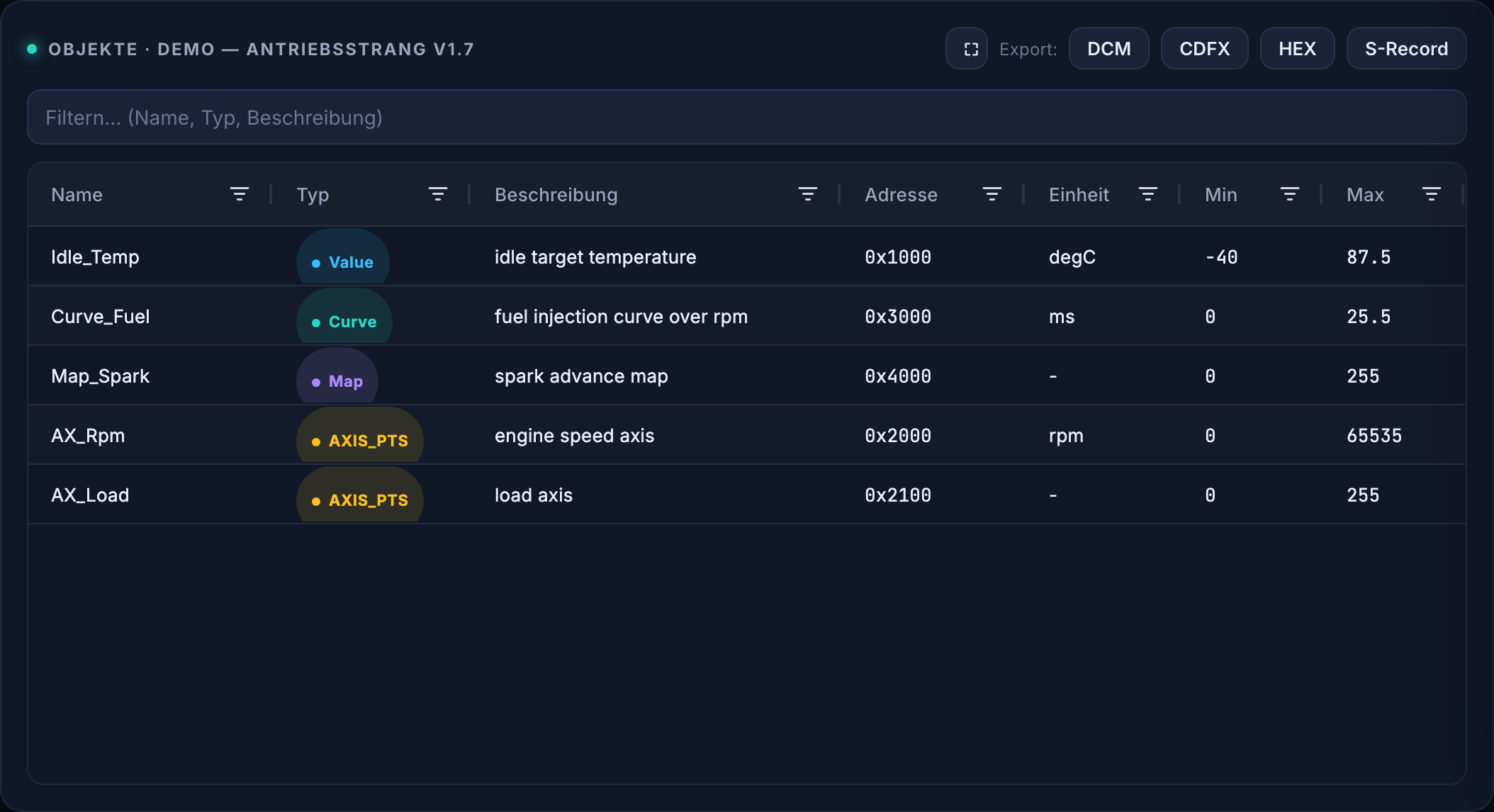
A2L/HEX version comparison with physical values and delta
Calibration data management for serious series calibration
Made for the people doing the calibration
VersaCal is tailored to the daily work of powertrain calibration teams – not a generic file store.
Calibration engineers
Understand, change, compare and release calibration parameters – with context, history and traceability across every state of the ECU application.
On-board diagnostics (OBD)
Consistency and plausibility checks, limit rules and traceable approvals for the OBD-relevant calibration state.
Engine ECU & powertrain
A2L parser, HEX diff, curves and maps, XCP live measurement – the tools your ECU calibration actually needs.
Calibration data management across the whole workflow
From the change through the calibration data review to release and porting onto the next software level.
Calibration data versioning
Every state traceable: versions, drafts, series levels, author and timestamp – like Git, but for calibration data.
AI assistance
Change summaries, risk scoring, natural-language rules and edits, a review bot and a knowledge assistant – optionally via your own AI endpoint.
Four-eyes calibration review
Change request, per-parameter comments, approval by a second role. Commit only after sign-off – with a certificate.
Plausibility checks
A2L and value consistency, limits, monotonicity, gradients, address overlaps, anomalies in curves and maps.
Live measurement over XCP
Read measurements straight from the ECU and apply calibration values online – simulator included for trials.
A2L/HEX diff
Compare two states parameter by parameter – physical values, delta, jump straight back to A2L source and HEX address.
Export to ASAM formats and forms
Delta DCM, CDFX (ASAM CDF), HEX/S-Record and PDF reports – results flow into your existing forms and release records.
Porting to new A2L levels
Move a calibration onto a new A2L/software level – renamed parameters are detected by AI and their value carried over.
Roles & corporate identity
RBAC (viewer / calibrator / approver), SSO via Microsoft Entra ID, SAML and OIDC, user provisioning via SCIM.
ASAM standards and ECU formats – natively supported
VersaCal speaks the formats your calibration work already uses. The built-in A2L parser reads the ECU description per ASAM MCD-2 MC and lays it over your HEX images – no detour through a desktop tool.
ASAM MCD-2 MC (ASAP2)
The built-in A2L parser reads calibration parameters and measurements including conversion rules, axes and memory layout. From any diff row you jump back to the original line of A2L source.
Standard at ASAM ↗Intel HEX & Motorola S-Record
Load HEX images, decode them address-accurately and compare them as physical values. Address overlaps and undecodable objects are reported; results go back out as HEX or S-Record.
ASAM MCD-1 XCP
Read live measurements from the ECU and apply calibration values online – over XCP, including a simulator for trials without attached hardware.
Standard at ASAM ↗ASAM CDF – Calibration Data Format
Export calibration datasets as CDFX for exchange with OEM processes and tool chains that build on the ASAM standard.
Standard at ASAM ↗DCM & delta DCM
Full and differential DCM files for hand-over into existing calibration tools, release forms and test-bench procedures.
On-board diagnostics
Limit rules and plausibility checks for the OBD-relevant calibration state – with enforced four-eyes approval and a complete audit trail.
An A2L/HEX comparison that explains every value
Compare two versions – or the open draft against its predecessor – parameter by parameter with physical old/new values and delta. From any row you jump straight into the A2L source or onto the HEX address. Export as CSV, PDF or delta DCM.
- Physical values incl. unit and delta
- Jump back to A2L source and HEX address
- Export as CSV / PDF / delta DCM
| Parameter | Alt | Neu | Δ | Risiko |
|---|---|---|---|---|
| Idle_Temp | 60.0 | 55.0 | −5.0 | hoch |
| Curve_Fuel[2] | 3.0 | 3.3 | +0.3 | mittel |
| Map_Spark[1,3] | 18.0 | 18.5 | +0.5 | niedrig |
| KNK_THRS_HI | 2.40 | 2.55 | +0.15 | mittel |
Plausibility and health – before release
A health report checks A2L consistency and values against their limits, finds address overlaps, undecodable objects and rule violations. The anomaly scanner detects non-monotonic axes, jumps and outliers in curves and maps – and the AI explains and triages the findings.
- Limits, monotonicity, gradients, saddle points
- Your own calibration rules in plain language
- AI explanation & triage: critical / review / intended

AI assistance – an assistant, not an autopilot
Summaries for the calibration data review, risk scoring of changed parameters, calibration edits and rules from natural language, a review bot and a dataset knowledge assistant. Every write suggestion goes through a preview and the four-eyes gate – nothing is applied unchecked.
- Optionally via your own AI endpoint (GDPR)
- Always preview, never direct write access
- Switchable off – the platform runs without AI too
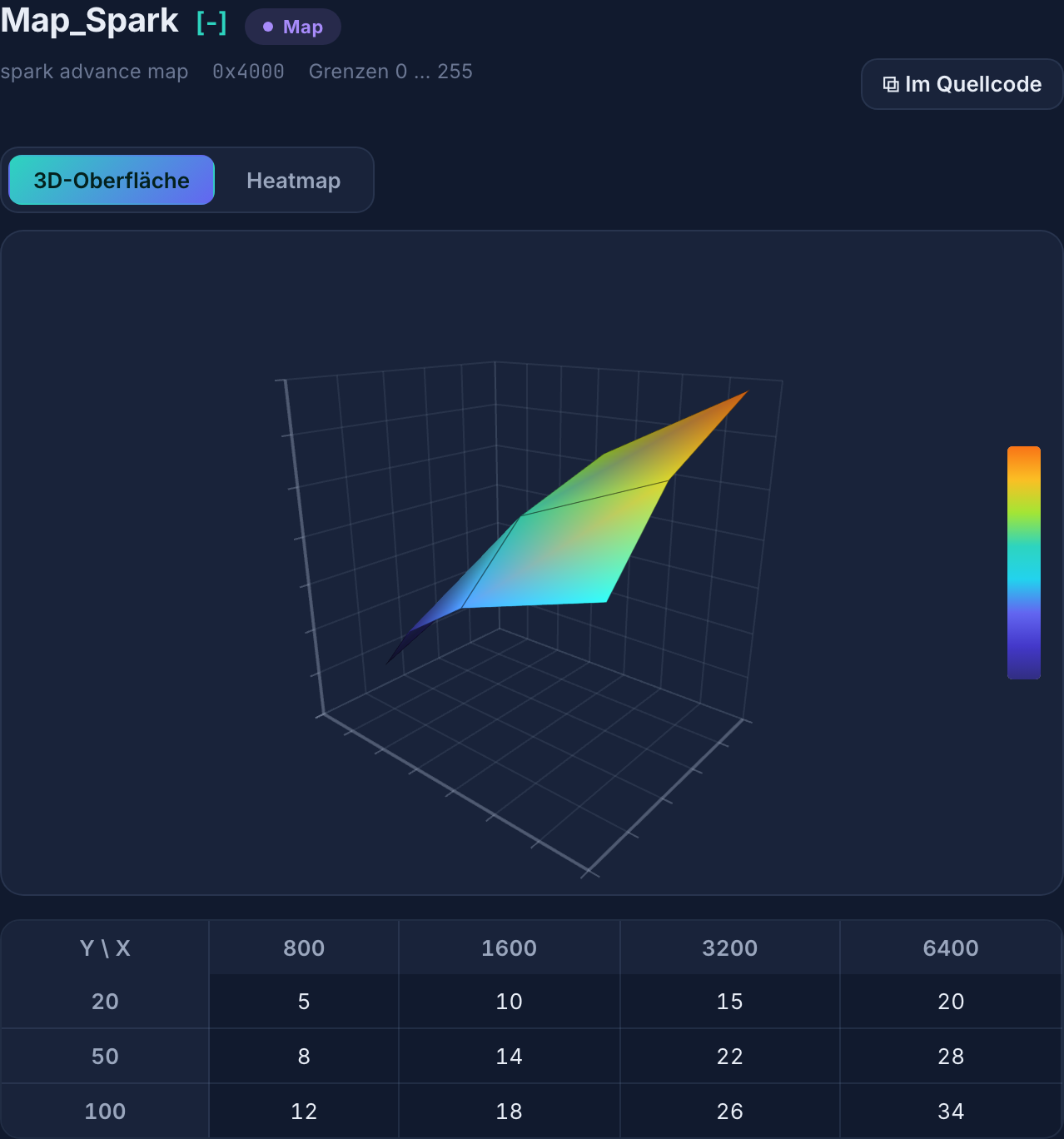
Calibration data management in VersaCal: 3D map decoded from A2L and HEX
Why VersaCal for calibration data management instead of classic tools?
Many calibration teams still work with heavyweight desktop tools and file shares. VersaCal is built for 2026 from the ground up.
| Classic desktop tools | VersaCal | |
|---|---|---|
| Access | Local install per workstation | Web-based – a browser is enough, nothing to install |
| Collaboration | File exchange, manual merges | Central versioning, reviews, comments, audit |
| Operation | Tied to the workstation | On-premise or in your cloud – your choice |
| AI support | None | Built in – possible via your own AI endpoint |
| Approval process | Informal, hard to prove | Four-eyes sign-off with certificate and audit trail |
| Identity | Local accounts | Microsoft Entra ID / SAML / OIDC, SCIM provisioning |
| Evolution | Vendor release cycles | Tailored to your needs |
Your data stays with you
VersaCal integrates flexibly into your environment. Calibration data is valuable know-how – it should not leave your house. That is exactly what the platform is built for.
On-premise
Entirely in your data centre. No outbound connection required.
Your private cloud
Operated in your cloud tenant (e.g. Azure), under your control and policies.
Your own AI endpoint
AI features can run against an in-house/EU endpoint – no calibration data to third parties.
GDPR-compliant operation
Storage and processing in your infrastructure, no telemetry, full control.
Operation, identity integration and data protection in detail →
Note: “GDPR-compliant operation” refers to the operating model (data kept in your infrastructure), not to an external certification.
Ready for corporate IT
Single sign-on
Microsoft Entra ID, SAML 2.0 and OpenID Connect – log in via your identity provider.
User provisioning
SCIM: create and revoke accounts and roles automatically from your directory.
Roles & permissions
Fine-grained RBAC: read, calibrate, approve – separated and traceable.
Audit trail
Who changed, commented and approved what and when – fully logged.
Multi-tenancy
Separate areas for teams, projects or model series – as an enterprise stage.
Custom development
As a partner we build exactly the features your process needs.
Calibration data management in detail: A2L, ASAM, OBD, HEX diff
Dedicated pages on the topics that come up daily in calibration work – with the formats, workflows and checks behind them.
A2L parser
Read A2L per ASAM MCD-2 MC in the browser and decode maps.
ASAM standard
Which standard governs what: MCD-2 MC, MCD-1 XCP and CDF.
OBD calibration
Check diagnostic limits and evidence the OBD-relevant state.
calibration data review
Change request, per-parameter comments, sign-off by a second role.
HEX diff
Compare two states parameter by parameter, with unit and delta.
on-premise calibration data
Operated in your own data centre or cloud tenant, without telemetry.
calibration software comparison
Web platform versus desktop tool — including the limits of both.
A tool that grows with your process
Instead of rigid release cycles we evolve VersaCal together with you – close to your calibration workflow, your formats and your release rules. As a design partner you help shape the roadmap.
Frequently asked questions about calibration data, A2L and OBD
The questions that come up most often in conversations with calibration teams – answered briefly and without marketing.
What is an A2L file – and why do you need an A2L parser?
An A2L file (ASAM MCD-2 MC, historically ASAP2) describes which calibration parameters and measurements an ECU contains, at which memory address they live and how raw values convert into physical values. Without that description a HEX image is just a byte sequence. An A2L parser reads the description and turns it into readable scalars, curves and maps. VersaCal ships the A2L parser: you load A2L and HEX and work directly with physical values including units.
Which ASAM standards and formats does VersaCal support?
ASAM MCD-2 MC (A2L) for the ECU description, ASAM MCD-1 XCP for live measurement and online calibration, and ASAM CDF (CDFX) for data exchange. On top of that come Intel HEX and Motorola S-Record for calibration images, plus DCM and delta DCM, which are established de-facto standards in everyday ECU calibration. Reports come as CSV and PDF.
How does a calibration data review work in VersaCal?
Changes are made in a draft, never directly in the series state. From that draft the calibration engineer opens a change request; VersaCal automatically produces the parameter-by-parameter comparison with physical old and new values and delta, plus a health report and risk scoring of the change. A second user with the approver role comments per parameter and signs off – only then is it committed, with a release certificate and audit trail. The four-eyes principle is technically enforced rather than merely agreed.
What do on-board diagnostics (OBD) have to do with calibration data?
A large share of OBD behaviour sits in calibration parameters: diagnostic limits, thresholds for fault paths, debounce times. Change such a value and you change the diagnostics-relevant behaviour of the ECU. That is why VersaCal checks limits and your own calibration rules automatically against the state, and documents every release of the OBD-relevant dataset traceably.
What sets VersaCal apart from classic calibration tools?
VersaCal is web-based: no client per workstation, one central versioned dataset instead of files passed around. Versioning, calibration data review, plausibility checks, porting and release live in one tool and one audit trail. Classic desktop tools remain strong at the test bench and in the vehicle – VersaCal covers the management, comparison, review and release of the calibration data.
Is my calibration data uploaded to somebody else's cloud?
No. VersaCal runs on-premise in your data centre or in your own cloud tenant. No outbound connection is required, there is no telemetry and no data is shared with third parties. The AI features can also run against an in-house or EU endpoint – and can be switched off entirely.
Can I port a calibration onto a new software level?
Yes. Porting lays the existing dataset over a new A2L: unchanged parameters are carried over, renamed ones are detected and mapped by AI suggestion, new and removed parameters are listed. Every suggestion passes preview and review before it lands in a state.
How does VersaCal integrate into corporate IT?
Through your identity provider: single sign-on via Microsoft Entra ID, SAML 2.0 or OpenID Connect, user and role provisioning via SCIM. Permissions are separated fine-grained into viewer, calibrator and approver; all actions land in the audit trail. Operation happens in your infrastructure, under your policies.
Does the AI replace the calibration engineer?
No. The AI summarises changes for the review, scores risk, explains anomalies in curves and maps, and turns natural language into rules or calibration edits. Every write suggestion goes through a preview and the four-eyes gate; the platform works fully with AI switched off.
Experience calibration data management in your environment
Book a demo. We show the platform on your workflow – and discuss integration into your infrastructure.